
단계별 실습 ⑧ — weekly-report 플러그인 제작→배포
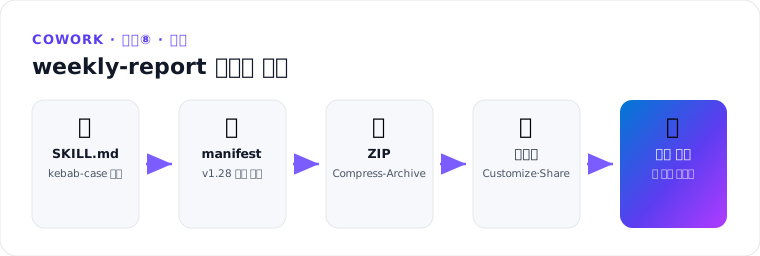
목표 — 실습④의 weekly-report 스킬을 플러그인 패키지로 만들어 업로드·공유합니다. 단계별 실습(⓪~⑧)의 마지막 — 개인 스킬이 배포 가능한 패키지가 됩니다. ⏱ 약 20분 · 사용 기능: manifest.json · ZIP · Customize 업로드
단계 1 — 폴더 구조
로컬에 다음 구조를 만들고, OneDrive의 weekly-report 스킬(SKILL.md·references)을 복사:
weekly-report-plugin/
├── manifest.json
├── color.png              # 192×192 (임시 아이콘 가능)
├── outline.png            # 32×32
└── skills/
    └── weekly-report/
        ├── SKILL.md       # name: weekly-report (폴더명과 일치 확인!)
        └── references/
            └── report-style.md
⚠️ SKILL.md의
name이Weekly Report(공백·대문자)였다면weekly-report로 수정 — kebab-case·폴더 일치(P006·P007).
단계 2 — manifest.json
{
  "$schema": "https://developer.microsoft.com/json-schemas/teams/v1.28/MicrosoftTeams.schema.json",
  "manifestVersion": "1.28",
  "version": "1.0.0",
  "id": "여기에-새-GUID",
  "developer": { "name": "본인/팀명", "websiteUrl": "https://example.com",
    "privacyUrl": "https://example.com/privacy", "termsOfUseUrl": "https://example.com/terms" },
  "name": { "short": "Weekly Report", "full": "Weekly Report Skill for Cowork" },
  "description": { "short": "주간 업무 보고서 자동 생성",
    "full": "최근 7일 메일·회의를 수집해 고정 양식의 주간 보고서를 생성하는 스킬" },
  "icons": { "color": "color.png", "outline": "outline.png" },
  "accentColor": "#2B579A",
  "agentSkills": [ { "folder": "./skills/weekly-report" } ]
}
단계 3 — 패키징·업로드
-
ZIP 생성:
Compress-Archive -Path manifest.json, color.png, outline.png, skills -DestinationPath weekly-report-plugin.zip - Customize → Plugins → Upload plugin → ZIP 선택
- Share — Only you (검증 후 동료 추가)
- 실패 시: 오류 메시지를 M5-5 검증 규칙 표와 대조
단계 4 — 발동 검증
- 새 세션 → “주간 보고서 만들어줘”
-
- 플러그인 스킬로 발동 (Sources & Skills에서 플러그인 확인)
- OneDrive 개인 스킬과 중복이면 개인 스킬 삭제 후 재확인 (같은 이름은 에이전트가 선택)
✅ 완료 기준 — 업로드한 플러그인의 스킬이 발동해 고정 양식 보고서가 나온다. 조직 배포는 실습⑦, 공개 스토어는 M5-6.
출처
출처: Build plugins for Copilot Cowork (MS Learn) · Use plugins — Upload your own plugin package (MS Learn)